Content Creator’s Guide: How to Shoot Amazing Reels in a Professional Studio
Instagram Reels have become the most powerful content format for reach and engagement. Whether you’re a lifestyle creator, beauty influencer, fashion blogger, or product-focused brand, shooting Reels in a professional studio can exponentially increase your content quality and engagement.
But here’s the challenge: most creators shoot Reels at home with poor lighting, distracting backgrounds, and audio issues. The result? Lower engagement and slower growth.
In this comprehensive guide, we’ll show you exactly how to shoot stunning, algorithm-friendly Reels in a professional studio setting.
Why Professional Studio Matters for Reels
The Reality of Home-Shot Reels:
- Poor, inconsistent lighting
- Distracting backgrounds
- Audio quality issues
- Limited backdrop variety
- Longer production time (more takes needed)
Professional Studio Advantages:
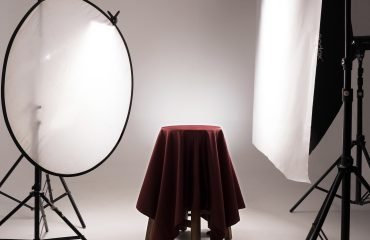
- Perfect three-point lighting (professional quality)
- Clean, branded backgrounds
- Professional audio capability
- Multiple set options in one session
- Reduced shooting time (better takes faster)
Impact: Professional studio Reels get 40-60% more engagement than home-shot content.
Part 1: Studio Setup for Reels
Choosing Your Backdrop
For Lifestyle/Wellness Content:
- White clean background (minimal, focused)
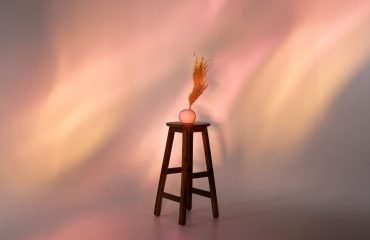
- Colored walls (vibrant, on-brand)
- Textured backgrounds (authentic, personality-driven)
- Best for: Daily life, wellness tips, routine content
For Fashion/Beauty Content:
- Styled sets (luxury, aspirational)
- Patterned backgrounds (trendy, eye-catching)
- Themed environments (contextual, story-driven)
- Best for: Outfit transitions, makeup tutorials, lookbooks
For Product/E-Commerce Content:
- White infinity backdrop (clean, focus on product)
- Lifestyle background (product in context)
- Multiple backdrops (shot variety without reshooting)
- Best for: Product reveals, unboxing, styling ideas
For Education/Tutorial Content:
- Clean, distraction-free background
- Branding elements visible (logo, colors)
- Enough space to demonstrate/move
- Best for: How-to, tutorials, tips & tricks
Studio Space Requirements for Reels
Minimum Space:
- 300-400 sq ft is sufficient
- Ceiling height: 9+ feet (for overhead lights and movement)
- Width: 12+ feet (for medium shots and movement)
- Depth: 12+ feet (for various angles)
Why size matters for Reels:
- Room to move (dancing, walking, transitions)
- Multiple camera positions (different angles)
- Lighting equipment space
- Styling/prep area
Studio Rollin advantage: 2,500 sq ft with 6 unique styled sets—perfect for variety without re-shooting.
Part 2: Lighting Setup for Reels
Reels are shot vertically on phones, which means lighting is different from traditional photography.
Mobile Reel Lighting Setup
For Bright, Clean Reels (Most Popular):
1. Main Light:
- Large softbox or LED panel in front, slightly to side
- Brightness: High (Reels need punchy lighting)
- Direction: At face level or slightly above
- Purpose: Even, flattering illumination
2. Fill Light:
- Opposite side softbox or reflector
- Brightness: 50-75% of main light
- Purpose: Soften shadows, keep face bright
- Special consideration: Mobile cameras need more fill than DSLRs
3. Back Light:
- Light behind for dimension
- Brightness: 30-50% of main
- Purpose: Separation from background
- Optional: For certain content styles
For Cinematic Reels (Moody, Artistic):
1. Single Key Light:
- Directional light at 45°
- Creates shadows and dimension
- More dramatic, less flat
- Requires good fill reflector
2. Fill Light:
- Reflector or low-level light
- Keeps important details visible
- Maintains mobile camera visibility
3. Back Light:
- Stronger for separation
- Creates moody, cinematic feel
Lighting Pro Tips for Reels
1. Brighter Than You Think
- Mobile phone sensors need more light than cameras
- Increase lighting 20-30% above normal photo lighting
- Under-lit Reels look cheap and get lower engagement
2. Consistent Lighting
- Keep same setup for multiple Reels (shot in same session)
- Consistency = polished, branded aesthetic
- Viewers notice inconsistent lighting and it feels amateur
3. Test on Your Phone
- Always review a test take on your phone
- Colors, brightness, shadows look different on phone
- Adjust before shooting entire Reel
4. Avoid Harsh Shadows
- Shadows look exaggerated on vertical video
- Use diffusers and fill light generously
- Professional studios have this nailed
Part 3: Reel Composition & Framing
Mobile Vertical Framing
Safe Area (What Viewers See):
- Left & right: Full width
- Top: Leave 10% blank (for status bar)
- Bottom: Leave 10% blank (for timeline)
- Center: Where eyes naturally focus
Composition Rules for Reels:
1. Rule of Thirds (Vertical)
- Divide into 9 sections vertically
- Place face/subject on intersecting lines
- Creates balanced, professional look
2. Head Room
- Leave space above head
- Typical: Head should occupy top third
- Too tight = feels claustrophobic
3. Depth of Field
- Slightly blurred background (shows you’re in studio)
- Clear focus on you (main subject)
- Professional depth vs. flat background
Framing by Content Type
Beauty/Makeup Content:
- Close-up: Face fills 60-70% of frame
- Mid-shot: Upper body, shoulders to top of head
- Full-shot: Entire outfit/look visible
- Variety: Mix all three for visual interest
Outfit/Fashion Content:
- Full-body: Entire outfit visible, head to toe
- Three-quarter: Head to knees (most flattering)
- Detail shots: Close-up of accessories, fabric
- Movement shots: Walking, spinning, posing changes
Tutorial/Educational Content:
- Wide shot: Full workspace visible
- Medium shot: Upper body and hands
- Close-up: Hands working on product/task
- Mix for clarity and engagement
Lifestyle/Vlog Content:
- Variety: Mix all framing distances
- Movement: Capture transitions and motion
- Reaction shots: Close-ups of facial reactions
- Context shots: Where you are, what you’re doing
Part 4: Audio & Sound for Reels
Audio is 50% of Reel success. Great audio = higher watch time.
Audio Options for Studio Reels
1. Trending Sounds
- Use Instagram’s Reels sound library (most important)
- Search relevant keywords
- Popular sounds get promoted (algorithm favors them)
- Tip: Use sounds while they’re trending (first 1-2 weeks)
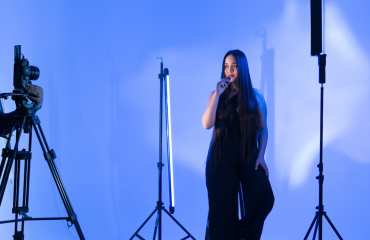
2. Original Audio
- Record yourself voiceover
- Speak clearly, good microphone quality
- Room tone: Eliminate echo (studios help)
- Use: Tips, tutorials, personal messages
3. Background Music
- Licensed music (avoid copyright claims)
- Match music to content vibe
- Volume: Loud enough to be engaging but not overwhelming
- Websites: Epidemic Sound, Artlist, Free Music Archive
4. Combination Audio
- Trending sound + voiceover
- Trending sound + background music
- Sound effect + voiceover + music
- Most engaging approach
Studio Audio Advantage
Professional studios provide:
- Quiet, isolated environment (no background noise)
- Better acoustics (no echo)
- Ability to record clean voiceover
- Better overall audio quality
Part 5: Reel Types That Drive Engagement
1. Educational/Tutorial Reels (Highest Engagement)
Content:
- 5-10 quick tips
- How-to demonstrations
- Before/after transformations
- Myths vs. Reality
Structure:
- Hook (0-1 sec): Compelling statement or question
- Education (1-25 sec): Tips/steps with B-roll
- Outro (25-30 sec): Call to action
Example:
- “3 Makeup Mistakes Everyone Makes”
- Hook: “You’re probably doing these 3 things wrong…”
- Show each mistake + correction
- Call to action: “Save this for reference!”
2. Transformation Reels (High Engagement)
Content:
- Product reviews (before/after with product)
- Outfit changes/styling
- Room makeovers
- Makeup transformations
- Fitness progress
Structure:
- Before state (0-5 sec)
- Transition (5-15 sec)
- After state (15-30 sec)
- Reaction/conclusion (25-30 sec)
Best for: Product brands, lifestyle creators, beauty creators
3. Trend/Trend-Jack Reels (Viral Potential)
Content:
- Participate in trending challenges
- Use trending sounds/music
- Trending transitions
- Current memes or internet jokes
Structure:
- Hook with trend element immediately
- Your unique twist on trend
- Keep it short and punchy
- Remember: Trends date quickly
Best for: Youthful, trendy, entertainment-focused brands
4. Behind-the-Scenes Reels (High Authenticity)
Content:
- Studio setup process
- Content creation behind-the-scenes
- Day-in-the-life content
- Process videos
Structure:
- Show something interesting happening
- Multiple quick cuts
- Fast-paced, entertaining
- Personal connection to audience
Best for: Building community, showing authenticity, personality brands
5. Transition Reels (Creative, Fun)
Content:
- Outfit changes via transition
- Location changes
- Makeup before/after with cut
- Dancing transitions between content
Structure:
- Smooth transition technique
- Hook viewers with visual interest
- Quick content delivery before/after
- Music-synced timing
Best for: Fashion, beauty, lifestyle, entertainment creators
6. Carousel/Multi-Part Reels (Storytelling)
Content:
- Multi-step tutorials
- Story-based content
- Product recommendations (3-5 options)
- “This or That” comparisons
Structure:
- Part 1: Hook and introduce concept
- Part 2-4: Detailed content
- Final part: Conclusion/CTA
- Fast cuts between parts
Best for: Educational, storytelling, comparison-based content
Part 6: Shooting Strategy in Studio
Batch Content Creation
The Efficient Approach:
Instead of 1 Reel per session, shoot 15-20 Reels per 4-hour studio session.
How to batch shoot:
Hour 1: Setup & Outfit 1 (8-10 Reels)
– Lighting setup and test
– Change into Outfit 1
– Shoot 8-10 different Reels using same outfit/background
– Different angles, transitions, concepts
Hour 2: Outfit 2 or Background Change (8-10 Reels)
– Quick outfit/styling change
– New backdrop or adjustment
– Shoot 8-10 more Reels
– Can repeat audio/trends with different angles
Hour 3: Outfit 3 & Behind-the-Scenes (4-6 Reels)
– Third outfit or styled set
– Bonus BTS content
– Lifestyle shots
Hour 4: Buffer Time & Transitions
– Re-shoot any unsatisfying takes
– Special transition shots
– Creative/experimental content
Studio Session Checklist
Pre-Shoot Planning:
- List 15-20 Reel concepts you’ll film
- Script/notes for voiceovers
- Trending sounds identified and noted
- 3+ outfit changes ready
- Hairstyle/makeup plan
- Props needed gathered
Studio Setup:
- Lighting tested on phone
- Backdrop clean and styled
- Backdrop lighting even (no dark corners)
- Audio tested (low background noise)
- Phone charging (shooting drains battery)
During Shoot:
- Test first Reel and review on phone
- Shoot multiple takes (not just one)
- Vary angles and framings
- Get transition shots
- Capture audio clearly
- Review as you go
Post-Shoot:
- Organize files by concept
- Back up to cloud storage immediately
- Plan posting schedule (optimal: 3-4x per week)
Part 7: Editing & Optimization
Basic Mobile Editing
Apps to use:
- CapCut (free, professional quality)
- InShot (user-friendly)
- Adobe Premiere Rush (professional)
Editing Steps:
1. Trim footage – Cut out mistakes, pauses
2. Add transitions – Smooth, quick cuts between scenes
3. Adjust colors – Brightness, contrast, saturation
4. Add text – Hook, key points, CTA
5. Add music/audio – Ensure sync
6. Final check – View in full, on phone, vertical
Optimization for Instagram Algorithm
Factors that boost reach:
- Watch time (longer = better, aim for 25+ seconds)
- Engagement (likes, comments, saves)
- Shares (highest value)
- Completion rate (people watching until end)
- Use of trending sounds (algorithm boosts)
Optimization tips:
1. Compelling Hook (0-1 second)
- Question, statement, or visual hook
- Stop the scroll immediately
2. Pacing
- Quick cuts keep viewers engaged
- Slow down for important messages
- Average shot: 2-3 seconds
3. Text/Captions
- Text covers key points
- Helps accessibility (no sound videos)
- Reinforces audio message
4. Call-to-Action
- “Save this for later”
- “Follow for more”
- “Tag someone who…”
- “What do you think?”
5. Trending Elements
- Sounds: Use within first 2 weeks of trend
- Hashtags: Mix popular + niche
- Formats: Join trending Reel formats
Part 8: Content Calendar & Posting Strategy
Optimal Posting Frequency
- Beginners: 2-3 Reels per week
- Growing creators: 4-5 Reels per week
- Established accounts: 5-7 Reels per week
Why frequency matters:
- More Reels = more chances for viral content
- Algorithm favors active accounts
- Consistency builds audience habits
Content Mix
Weekly recommendation:
- 2-3 Educational Reels (tutorials, tips)
- 1-2 Trend/Entertainment Reels
- 1 Behind-the-Scenes or Lifestyle
- 1 Product/Promotional (if applicable)
Posting Schedule
Best times to post (India Standard Time):
- Tuesday-Thursday: 9-10 AM or 6-7 PM
- Friday: 12-1 PM or 7-8 PM
- Avoid: Saturday, Sunday (lower engagement)
Why scheduling matters:
- Post when your audience is most active
- Use Instagram’s scheduling feature
- Or post at consistent time daily
Studio Rollin for Reel Creators
Studio Rollin is PERFECT for content creators shooting Reels:
✓ The Bold Red – Vibrant, trendy, energetic content
✓ Tanjore Gold – Luxury, sophisticated, premium brand vibes
✓ The French White – Elegant, clean, sophisticated
✓ Foresta Green – Nature-inspired, bohemian, organic
✓ The Infinity – Clean, minimal, modern aesthetic
✓ The Expanse – Spacious for movement, transitions, dynamic content
Perfect Setup for Reels:
✓ Professional 3-point lighting (no harsh shadows)
✓ Full-length mirrors (for posing checks)
✓ Makeup vanity (look your best)
✓ Wi-Fi included (upload immediately)
✓ Props packages (₹1,500 for styling variety)
✓ Expert team (posing, styling guidance)
✓ Affordable: Start from ₹2,999 (4-hour sessions perfect for 15-20 Reels)
Why creators love Studio Rollin:
- Shoot 15-20 Reels in 4 hours
- Multiple set changes without traveling
- Professional lighting (reduces editing)
- Consistent, branded aesthetic
- Flexible hours for content creators
- Expert support for posing and styling
Conclusion
Shooting amazing Reels in a professional studio elevates your content quality, increases engagement, and accelerates growth. By mastering studio setup, lighting, framing, and content strategy, you’ll create Reels that stand out and drive real results.
The investment in professional studio time pays for itself through increased engagement and growth.
Ready to level up your Reel game? Book Studio Rollin today and start creating content that stops the scroll.
Book Now and get ready to grow your Instagram presence exponentially.